Printing can involve many steps, especially when you are producing brochures, pamphlets, packaging, catalogues, or textbooks. Understanding common printing terms can make the process easier.
One term you may come across is “collate.” In printing, collating means arranging pages or printed items in the correct order. This is useful when producing multi-page documents, booklets, brochures, books, reports, and some types of packaging.
The UK custom-printing market is expected to grow at a compound annual growth rate of 11.5% from 2026 to 2030. As more businesses invest in printed materials, knowing how printing processes work can help you choose the right service.
What does collating mean?
Collating is the process of arranging printed pages, sheets, or components in a predetermined sequence. For example, a 12-page brochure may be printed and assembled as pages 1 through 12 for each copy.
The same principle can apply to custom packaging. When printing personalised donut boxes, for example, collation helps ensure that the correct panels, designs, and information are prepared in the intended order. This matters particularly for multi-panel packaging and complex designs.
When is collating useful?
Collating is useful whenever printed materials need to follow a specific order. Common examples include:
- Books and booklets
- Magazines and catalogues
- Reports and manuals
- Brochures and presentations
- Billing books
- Printed packaging components
- Food packaging and display boxes
When several copies of a multi-page document are printed, collating ensures that each copy contains the pages in the correct sequence. This saves the time and effort that would otherwise be needed to sort the pages manually.
Benefits of collated printing
Before automated printing equipment became common, people often had to sort multi-page documents by hand. That process took time and could lead to misplaced or missing pages.
Collated printing reduces this work by arranging the pages automatically or by following a clear sorting process.
Consistent results
Printing equipment can arrange pages consistently, reducing the chance of missing or incorrectly ordered pages. This is especially helpful when producing books, magazines, reports, and booklets in large quantities.
Easier document preparation
Once the printer has been set up, collating makes it easier to produce complete document sets. Even people with limited printing experience can use the function with the right equipment and settings.
Lower labour costs
Automated collation reduces the need for manual sorting. This can lower labour costs and make large printing jobs more efficient.
Faster production
Collated printing saves time because the pages are arranged during the printing process. It also reduces the need to sort or reprint incorrectly assembled sets.
Free design assistance and printing support
Hi Custom Boxes provides free design assistance and free shipping within the UK. Customers can customise their printed packaging to suit their brand and product requirements.
If you are launching a business or updating your packaging, contact Hi Custom Boxes for help with custom printed boxes and packaging.
How does collation work?
There are two main ways to collate printed materials: manually or automatically.
Manual collation
Manual collation involves arranging printed pages or documents by hand. The pages are checked and placed in the correct order, including any different versions or editions.
This method requires care and attention to detail. It may be suitable for smaller printing jobs or documents that need to be checked individually.
Automatic collation
Automatic collation uses printing equipment or software to arrange pages in the required sequence. Depending on the system, the software or printer may check details such as page order, formatting, font size, and spacing.
Automatic collation is generally faster than manual sorting and is more practical for larger print runs.
Collated vs. uncollated printing
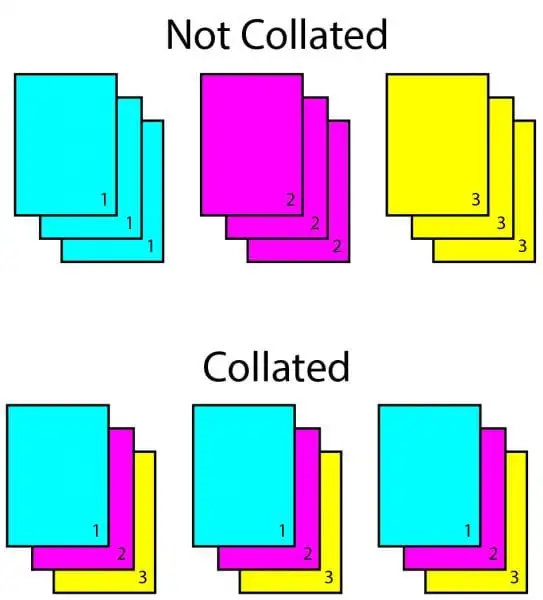
The difference between collated and uncollated printing is the order in which the pages are produced.
Collated copies
Collated copies are arranged in the correct sequence. If you print three copies of a four-page document, each set will usually be arranged as:
- Page 1
- Page 2
- Page 3
- Page 4
This sequence is repeated for each copy.
Uncollated copies
Uncollated copies are grouped by page rather than by complete document. Using the same example, the printer may produce all copies of page 1, followed by all copies of page 2, page 3, and page 4.
Uncollated printing can be useful when the pages will be used separately or assembled later.
Common uses for collated printing
Collation is used in many printing and packaging applications, including:
- Custom boxes: Packaging components can be printed and prepared in the required order.
- Reports: Pages can be arranged into complete report sets.
- Manuals and guides: Instructions can be printed chronologically to make them easier to follow.
- Billing books: Pages can be arranged to keep customer and transaction information in order.
- Presentations: Slides can be printed in sequence, with multiple complete sets produced at once.
Final thoughts
In printing, collating means arranging pages or printed components in the correct sequence. It is useful for books, brochures, reports, manuals, presentations, and some packaging projects.
Collation can save time, reduce manual labour, and help prevent pages from being placed in the wrong order. Whether you need collated or uncollated printing, choose a printing company that can meet your quality and packaging requirements.
Hi Custom Boxes can help with custom printed packaging boxes and other printing services. Contact the company to discuss your project.
Need packaging advice for your next order?
Share your box size, material, quantity, and artwork needs. Our team can guide you before production starts.